
People watch familiar faces
Friends recognize the birthday star in the first second, which is why personal videos get replayed and forwarded far more than stock greetings.
App
Media
Photo 1 - Birthday Star
Photo 2 - Party Co-Host
JPEG, PNG, WEBP · ≤ 10 MB
Settings
Length
Frame
Add Photo 1 - Birthday Star to continue
1Upload the birthday star
Photo 1: one person, face clearly visible.
2Add the friend who gives the toast
Photo 2: partner, friend or sibling.
3Pick length and frame
9:16 by default for stories; 10 s fits both verses.
Your generations will show up here.
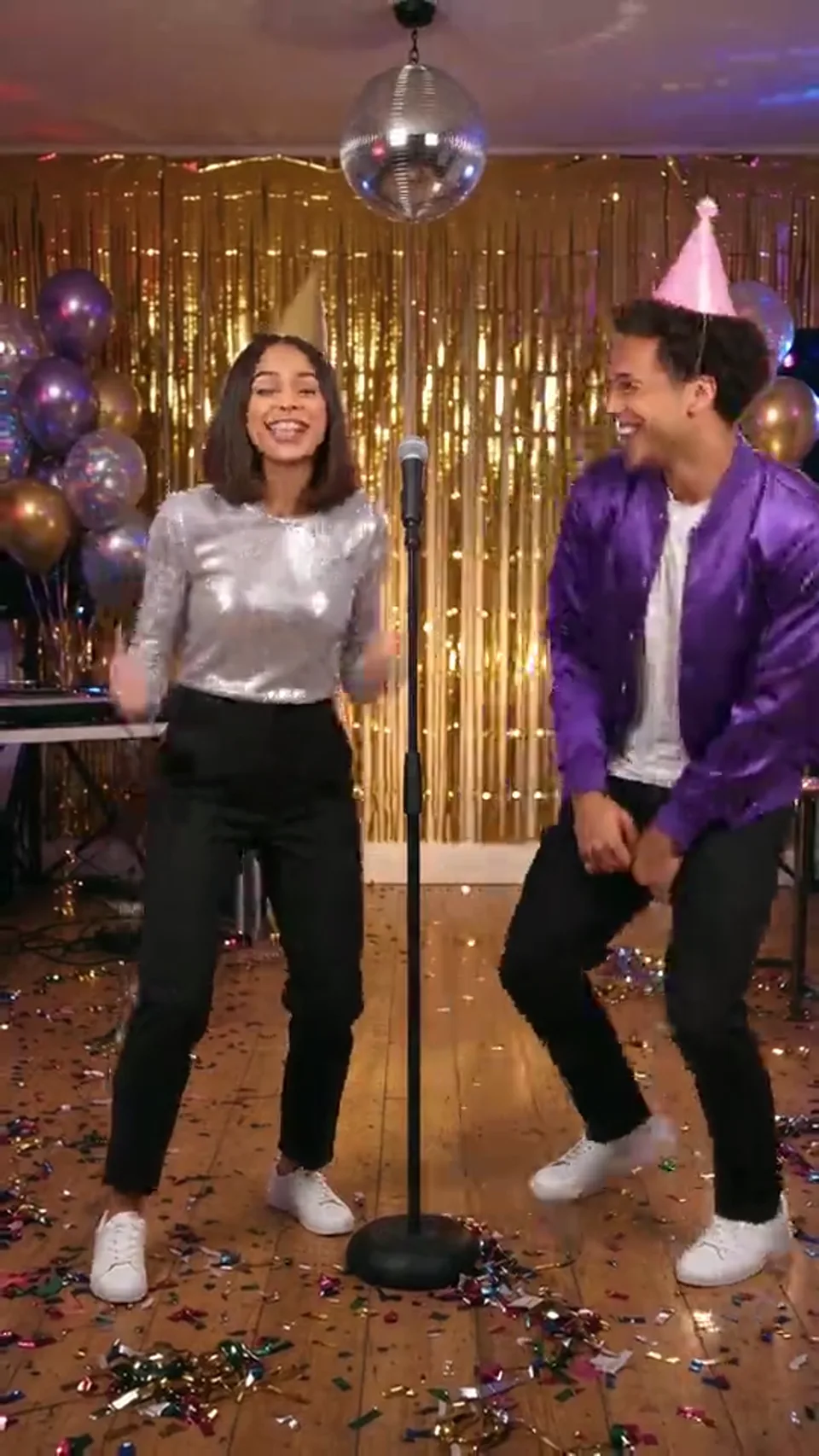
Make a personal birthday rap from two photos: the birthday star and a friend trade celebration verses under a disco ball.
This sample was generated with the same built-in scene brief the App uses. It shows the vertical party lounge, the two-part verse structure and the kind of beat and vocals you get.
Scene
A glittering party lounge with a mirror ball, neon light and confetti. The left performer raps the celebration verse, then the right performer takes over with the toast.
What it makes
A store-bought card says happy birthday; a birthday rap says it with a beat. The App places two people from your photos in a disco party lounge and generates a short music video in which they rap to the camera, with lip-sync, original music and festive lighting already in place.
Mirror ball, warm neon, balloons and confetti are part of every take, so the clip already looks like a party.
The birthday star opens with the celebration verse, then the co-host steps in with the toast, so both people get their moment.
Why it works
Birthday messages are easy to scroll past. A short video with familiar faces is not.
Friends recognize the birthday star in the first second, which is why personal videos get replayed and forwarded far more than stock greetings.
Seeing someone you know rap a celebration verse under a mirror ball is the joke. You do not need to write anything clever for the birthday rap to land.
A vertical ten-second clip drops straight into a group chat, a story or a slideshow at the party, without any editing.
The cast
The order of the uploads decides who stands where and who raps first.
Stands on the left and raps the opening verse straight to the camera while the friend grooves alongside.
Stands on the right, smiles through the first half, then raps the birthday toast with the punchlines.
An upbeat disco-trap track and the rap vocals are generated with the picture. Nothing is taken from an existing song.
A VIP birthday lounge stays the same in every take, so you only have to think about the people.
How it works
There is no lyric sheet to fill in and no editing timeline. The work is choosing the right pair of photos.
Step 01
Pick the birthday person and one friend, partner or family member to share the stage.
Step 02
Front-facing photos with the whole face visible work best. Crop out other people.
Step 03
Ten seconds is the default and fits both verses. Use 9:16 for stories and chats, 16:9 for a TV or slideshow.
Step 04
Watch the result in History. If a line or a mouth movement looks off, run it again; each take is different.
Photo guide
Lip-sync and likeness depend on the faces the model can see.
Group shots confuse the casting. Crop each portrait to a single person before you upload.
A straight or slightly angled face with eyes visible gives the clearest mouth movement.
Daylight or even indoor light beats heavy beauty filters, sunglasses or deep shadows.
Use photos of people who are happy to appear in a rap video, especially if you plan to post it.
Ideas
Any two people who would trade a few lines at a party.
A surprise for a girlfriend, boyfriend, husband or wife, with you as the co-host.
A video message from a friend who could not make the party.
Grown-up children cast with a parent for a milestone birthday. Use photos of adults or ask a parent first.
A team send-off for a coworker's birthday, posted in the group chat.
Specs and credits
The App runs on Seedance 2.0 at 720p with sound always on.
Ten seconds is the default. Five seconds leaves room for little more than the first verse.
Vertical is the default for stories, reels and messaging apps.
Seedance 2.0 at 720p costs 24 credits per second: 120 for 5 s, 240 for 10 s, 360 for 15 s. The form shows the price first.
The App is available on paid plans. Results are private by default.
Before you share
A few practical points that save a second attempt.
Generate a day early so you have time for a second take if the first one is not quite right.
The song does not include names, so write the dedication in the message or as on-screen text when you post.
Save the MP4 from History to play it on a TV or projector during the celebration.
Results are private by default, so nobody sees the birthday rap until you share it.
FAQ
What to know before you make one.
Start
Two photos, ten seconds and a beat. Send it before the cake comes out.
More rap scenes: AI Roast Battle · Kitchen Duo Rap · Carpool Crew Rap